Staff Account Permission Groups
Permission groups determine what actions staff are allowed to perform in the software. Here are the different permission groupings that are available for Evergreen staff accounts.
All Staff Accounts
Many permissions are shared among all staff accounts. All staff can do the following:
-
View patron accounts, including bills, holds, and items checked out
-
Check items in and out
-
Renew items
-
Place and update patron holds on all levels (title, volume, copy, part)
-
Edit items
-
Change the status of an item (except lost or lost and paid)
-
View and run reports
-
Check in/receive serials (for libraries using this module)
Regular Staff
These are groups that Local User Admin staff can assign to staff accounts as primary or secondary groups.
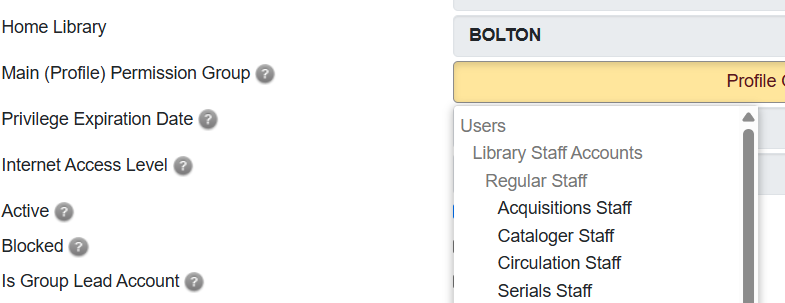
Acquisitions Staff
Staff have permissions to perform functions in Evergreen’s acquisition module. Staff must have training in this module to be able to use it.
Cataloger Staff
These accounts have permission to:
-
Add and delete items and volumes
-
Add parts to an item
-
View elements of the acquisitions module (picklists and purchase orders)
Circulation Staff
These accounts have permission to:
-
Create, delete, and edit patron accounts
-
Block patron accounts and remove blocks (at your library or a library branch) --Merge patron accounts
-
Create, pay, and adjust patron bills
-
Mark items lost or claims returned by patron
-
Override circulation errors/blocks (maximum checkout, maximum bills, maximum lost, maximum renewals, place duplicate holds, etc.)
| If a staff member will be a member of several permission groups including Circulation Staff, it is recommended that Circulation Staff be assigned as their Main Profile (Permission) Group and all other groups be added as secondary permission groups. |
Restricted or Limited Staff
An optional group that will be created for the library if it has a need for accounts with fewer permissions than those granted to a standard staff account. The permissions for these accounts are unique to each library that uses them. They are recommended for libraries that have shared logins at the circulation desk or volunteer logins. This should be the staff member’s only group, with no secondary groups assigned.
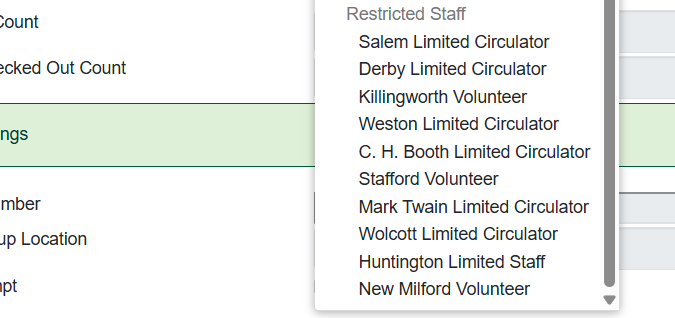
You will see all of the Limited Staff Accounts for all libraries when logged in as a Local User Admin. Please select the one for your library to ensure it has the proper permissions. If your library is not on the list and you’d like to set up a limited staff permission group, contact the Help Desk and a Bibliomation staff member will work with you to set the permissions you want the group to have.
Local Admin Accounts
These permission groups can only be assigned by Bibliomation staff. Requests to add users to these permission groups must be made by the director via the help desk.